
A Gmail Reply Assistant for Emails with Several Decisions
The hardest part of a reply is often deciding what to agree to. MailCat makes those decisions visible before assembling the wording.
7 days free, no card. Then US$9.99/month plus applicable taxes.
Useful when one email contains several asks
Fictional incoming message
Can we launch Thursday, add a mobile layout, and review it Friday morning?
A smooth “Sounds good” can read like acceptance of every request. Before drafting, you need to decide which date is feasible, whether extra work needs approval, and what meeting time you can attend. MailCat is designed around that decision step—not around automatically answering on your behalf.
See the decisions separately from the prose
Click Reply in desktop Gmail. MailCat analyzes the visible target message and relevant visible quotations, then presents points with suggested answers. Choose an option, enter a custom answer, or skip a point. Put missing context in “Anything else to include?”
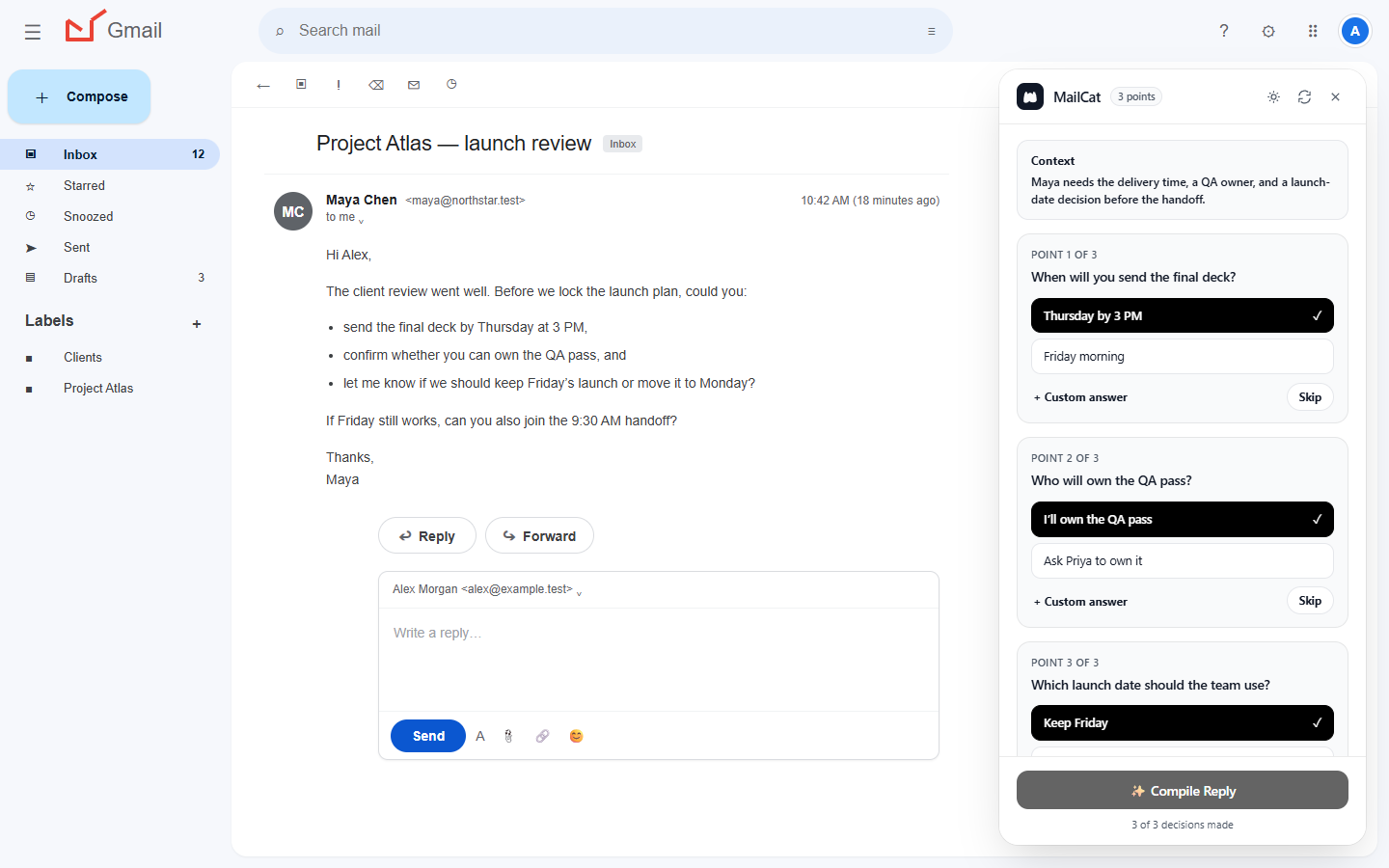
For our example, your decisions might be: Thursday depends on final feedback; mobile is additional scope; Friday morning is unavailable. Those facts come from you. Check that the identified points match the original message, because AI can miss details.
Compile, edit, then explicitly insert
After every detected point is answered or skipped, Compile Reply creates an editable preview. Include at least one answer or instructions. Read the preview against your decisions, edit directly, or describe a change and use Update draft.
Original fictional example, not a recorded model output
Hi Sam,
I can deliver Thursday if final feedback arrives Tuesday. The mobile layout is additional scope; I will prepare an estimate for approval before starting it. Friday morning does not work for me. Could we choose another review time?
Thanks,
Alex
Explicit Insert reply places the text into the connected Gmail editor while preserving existing draft content. Check the combined email, recipients, and attachments before pressing Send yourself. MailCat never automatically sends an email.
Is this the right fit?
- Consider it: you answer multi-point client or project emails and want a separate review of your decisions.
- Keep it simple: a short acknowledgment may be quicker to type yourself.
- Not supported: Outlook, mobile Gmail, calendar lookup, attachment analysis, and background entire-inbox processing.
- You still verify: names, dates, amounts, approved scope, and whether a message may be shared for AI processing.
This is a Chrome extension for Gmail, with a minimum supported Chrome version of 127. Its usefulness depends on your messages and review habits; there is no promised number of minutes saved.
Trial, price, and processing
Your seven-day trial begins at account creation, needs no card, and does not automatically charge you. Continued access is US$9.99 per month plus applicable taxes. Fair-use, capacity, and service-availability safeguards apply. See the plan details.
Relevant message information, choices, and instructions go through MailCat's backend and AI providers. Review the privacy disclosure before using confidential email. “Never sends” describes who controls email sending, not an assertion that processing stays entirely on your device.
For installation and exact steps, follow the Gmail walkthrough. For a manual method, use the multiple-question answer map. Compare different forms of assistance in our Gmail workflow comparison.
7 days free, no card. Then US$9.99/month plus applicable taxes.